

How often aiGust syncs
aiGust syncs the data of all administrations every night. Changes you make in the bookkeeping during the day show up in aiGust the next morning. If you need them sooner, start a sync yourself.Read the Data source widget
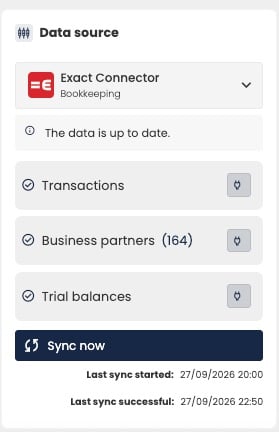
The Data source widget of an administration synced from Exact Online.
- The connector the data comes from, for example Exact Connector, and its type: Bookkeeping or Compliance.
- The status of the data. See Status messages.
- Which data is imported, such as Transactions, Business partners and Trial balances. What’s available depends on the type of connector. See Bookkeeping and compliance connectors.
- Last sync started and Last sync successful.
Bookkeeping and compliance connectors
With a compliance connector, you can’t see the transactions behind a figure, group a report by business partner, or open documents.
Status messages
The dates at the bottom tell you more. If Last sync started is more recent than Last sync successful, the last sync is still running or has failed. The figures then date from the last successful sync.
If a sync keeps failing, report it to support.
Start a sync
Click Sync now to sync the administration right away, on top of the nightly sync. A sync usually takes 5 to 15 minutes. The screens refresh automatically when it’s done.When a nightly sync fails, aiGust runs it again. While that repair runs, Sync now can be disabled for a few hours. Try again later.
Switch the data source
Some administrations exist in more than one connector, for example in Exact Online for the bookkeeping and in Silverfin for the annual accounts. aiGust then uses one of them as the data source. To use another one:- Click the connector at the top of the widget.
- Choose the other connector.
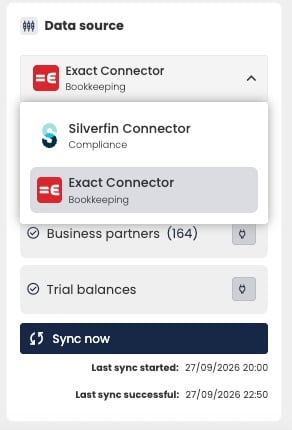
Choosing between the connectors in which the administration exists.
Related pages
- How administrations are imported, for your firm’s admins
- Check connector status, for the status of all connectors of your firm