What to check the first time you open an administration, so its figures, KPIs and benchmarks are right from the start.
aiGust fills in most of a new administration by itself: its figures, its sector and company type, and a label for each account. Those are suggestions. Check them once, the first time you open the administration. Your reports, KPIs, benchmarks and meetings are then right from the start.It takes a few minutes for most administrations. The label mapping can take longer for a large chart of accounts.
1
Verify the sector and company type
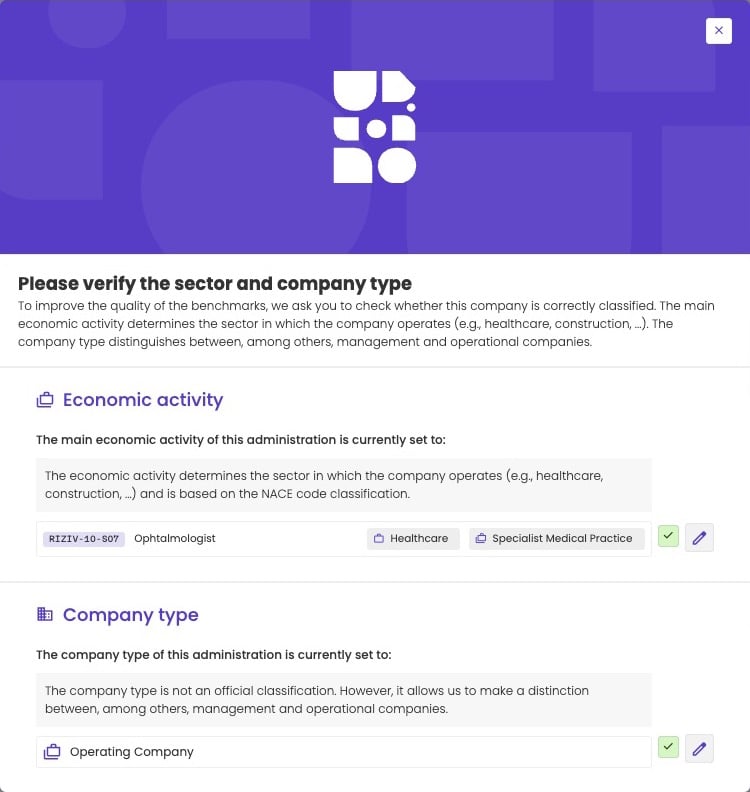
The first time you open the administration, the Please verify the sector and company type pop-up opens. Check the economic activity and the company type, change them if needed, and confirm. They decide which peers aiGust compares the administration with.
On the dashboard, the Data source widget shows where the figures come from and when they were last synced. Check that it’s the right source. A bookkeeping connector gives you more than a compliance file: monthly figures, business partners and transactions.See Data source and sync.
3
Check the label mapping
Go to Settings › Mapping in the administration menu. The Work to do! banner shows how many accounts still need checking. Click Resolve to go through them one group at a time. Pay most attention to the Uncertain cases and the Unlabeled accounts. Wrong labels skew the label KPIs, such as energy costs, and the benchmarks.
The Work to do! banner shows what's left to check.
Split costs into fixed and variable, if you use the contribution margin
To show a contribution margin in the profit and loss, set the variable part of each cost account on the Contribution margin tab, next to Mapping. Skip this step if you don’t use it.See Contribution margin.
5
Choose a relevant peer group
aiGust compares the administration with a default peer group: companies in the same subsector, or the same subsector and company type. Check whether those peers are really comparable. A small family business and a large group in the same subsector often aren’t.If they aren’t, create a custom peer group, for example with a size range on turnover or employees. Keep a margin above the minimum of 10 peers. See Tips for a good peer group.Then click Data settings at the top of the page, and choose the peer group under Benchmark group. Everyone who opens the administration, and your client in the client portal, sees the same peer group. See Select the peer group.
6
Follow the administration, if you work on it
Click Follow at the top of the dashboard. You then find the administration quickly with Following only, in the list of administrations and in the alerts. See Follow the administrations you work on.
7
Give your client access, if you want
Add the people at your client who should see their figures and meetings in the client portal, on the Client access tab.See Give your client access.
Then get to work
Read the dashboard
The KPIs of the administration at a glance.
Open the financial reports
Profit and loss, balance sheet and cash flow, with the benchmarks.
Prepare a meeting
Turn the figures into a meeting with your client.
Make a forecast
Look ahead with your client.
⌘I
{"docsConfig":{"theme":"almond","$schema":"https://mintlify.com/docs.json","name":"aiGust","colors":{"primary":"#583DC6","light":"#A090EC","dark":"#583DC6"},"logo":{"light":"https://mintcdn.com/ai-gust/gy3UMttP2Bl7b7Yl/logo/light.svg?fit=max\u0026auto=format\u0026n=gy3UMttP2Bl7b7Yl\u0026q=85\u0026s=40d8d0d0db7e445e32005a398ff2ae5b","dark":"https://mintcdn.com/ai-gust/gy3UMttP2Bl7b7Yl/logo/dark.svg?fit=max\u0026auto=format\u0026n=gy3UMttP2Bl7b7Yl\u0026q=85\u0026s=5ec6638b0396e2d088842938f33e0a88"},"favicon":"https://mintcdn.com/ai-gust/gy3UMttP2Bl7b7Yl/favicon.svg?fit=max\u0026auto=format\u0026n=gy3UMttP2Bl7b7Yl\u0026q=85\u0026s=c1783d5c99adeb9fb8eeedb47590de1b","navbar":{"primary":{"type":"button","label":"Go to aiGust","href":"https://app.ai-gust.io"}},"footer":{"socials":{"linkedin":"https://linkedin.com/company/aigust"}},"fonts":{"heading":{"family":"Poppins"},"body":{"family":"Inter"}},"styling":{"latex":false},"navigation":{"pages":[]}},"deployment":{"deploymentMetadataValue":{"subdomain":"ai-gust","hasAudioNarration":false,"actualSubdomain":"ai-gust","customDomains":["docs.ai-gust.io"],"gitSource":{"type":"github","owner":"ai-gust","repo":"user-docs","deployBranch":"main","contentDirectory":"","isPrivate":false,"mountPath":"","label":""},"entitlements":{"AI_CHAT":{"status":"DISABLED"},"WEB_MCP":{"status":"DISABLED"},"NARRATION":{"status":"DISABLED"}},"buildId":"6ae9c4654867c64450fc149d","clientVersion":"0.0.4270","searchFilterCounts":[{"language":"default","tag":"User guide","count":84},{"language":"default","tag":"Key user guide","count":47},{"language":"default","tag":"Meetings","count":33},{"language":"default","tag":"Meeting editor","count":26},{"language":"default","tag":"Widgets","count":21},{"language":"default","tag":"Connect your data","count":20},{"language":"default","tag":"Financial reports","count":15},{"language":"default","tag":"Bookkeeping data","count":13},{"language":"default","tag":"Getting started","count":9},{"language":"default","tag":"Reports","count":9}]},"assistantConfig":{"enableAskAiButton":false,"enableStarterQuestions":false,"enableContextualStarterQuestions":false,"enableAskAiSearchBar":true},"basePath":"","hasChatPermissions":false,"hasWebMcpPermissions":false,"toggles":[{"name":"kill-isr","enabled":true,"variant":{"name":"disabled","enabled":false,"feature_enabled":true},"impressionData":false},{"name":"custom-rbac-roles","enabled":true,"variant":{"name":"disabled","enabled":false,"feature_enabled":true},"impressionData":false},{"name":"agent-mintlify-slack","enabled":true,"variant":{"name":"disabled","enabled":false,"feature_enabled":true},"impressionData":false},{"name":"agent-integrations-settings","enabled":true,"variant":{"name":"disabled","enabled":false,"feature_enabled":true},"impressionData":false},{"name":"rbac-expansion","enabled":true,"variant":{"name":"disabled","enabled":false,"feature_enabled":true},"impressionData":false},{"name":"automations-pr-grouping","enabled":true,"variant":{"name":"disabled","enabled":false,"feature_enabled":true},"impressionData":false},{"name":"custom-prefix","enabled":true,"variant":{"name":"disabled","enabled":false,"feature_enabled":true},"impressionData":false},{"name":"analytics-v7","enabled":true,"variant":{"name":"disabled","enabled":false,"feature_enabled":true},"impressionData":false},{"name":"user-flows-analytics","enabled":true,"variant":{"name":"disabled","enabled":false,"feature_enabled":true},"impressionData":false},{"name":"no-publish-flow","enabled":true,"variant":{"name":"disabled","enabled":false,"feature_enabled":true},"impressionData":false},{"name":"workos-onboarding","enabled":true,"variant":{"name":"disabled","enabled":false,"feature_enabled":true},"impressionData":false},{"name":"snapshot-serving-live","enabled":true,"variant":{"name":"disabled","enabled":false,"feature_enabled":true},"impressionData":false},{"name":"stripTemperatureMiddleware","enabled":true,"variant":{"name":"disabled","enabled":false,"feature_enabled":true},"impressionData":false},{"name":"support-platform-pylon-zendesk","enabled":true,"variant":{"name":"disabled","enabled":false,"feature_enabled":true},"impressionData":false},{"name":"snapshot-serving","enabled":true,"variant":{"name":"disabled","enabled":false,"feature_enabled":true},"impressionData":false},{"name":"instant-rollback","enabled":true,"variant":{"name":"disabled","enabled":false,"feature_enabled":true},"impressionData":false},{"name":"granular-notifications-server","enabled":true,"variant":{"name":"disabled","enabled":false,"feature_enabled":true},"impressionData":false},{"name":"granular-notifications","enabled":true,"variant":{"name":"disabled","enabled":false,"feature_enabled":true},"impressionData":false},{"name":"automations-fable","enabled":true,"variant":{"name":"disabled","enabled":false,"feature_enabled":true},"impressionData":false},{"name":"fixed-ai-action-pricing","enabled":true,"variant":{"name":"disabled","enabled":false,"feature_enabled":true},"impressionData":false},{"name":"site-roles","enabled":true,"variant":{"name":"disabled","enabled":false,"feature_enabled":true},"impressionData":false},{"name":"automation-resolve-merge-conflict","enabled":true,"variant":{"name":"disabled","enabled":false,"feature_enabled":true},"impressionData":false},{"name":"scoped-publishing","enabled":true,"variant":{"name":"disabled","enabled":false,"feature_enabled":true},"impressionData":false},{"name":"mintql","enabled":true,"variant":{"name":"disabled","enabled":false,"feature_enabled":true},"impressionData":false},{"name":"page-level-analytics","enabled":true,"variant":{"name":"disabled","enabled":false,"feature_enabled":true},"impressionData":false},{"name":"editor-version-history-v2","enabled":true,"variant":{"name":"disabled","enabled":false,"feature_enabled":true},"impressionData":false},{"name":"billing-page-v2","enabled":true,"variant":{"name":"disabled","enabled":false,"feature_enabled":true},"impressionData":false},{"name":"full-page-search","enabled":true,"variant":{"name":"disabled","enabled":false,"feature_enabled":true},"impressionData":false},{"name":"workspace-projects","enabled":true,"variant":{"name":"disabled","enabled":false,"feature_enabled":true},"impressionData":false},{"name":"assistant-v5","enabled":true,"variant":{"name":"disabled","enabled":false,"feature_enabled":true},"impressionData":false},{"name":"fork-pr-previews","enabled":true,"variant":{"name":"disabled","enabled":false,"feature_enabled":true},"impressionData":false},{"name":"revalidation-jwt","enabled":true,"variant":{"name":"disabled","enabled":false,"feature_enabled":true},"impressionData":false},{"name":"workos-sso-scim","enabled":true,"variant":{"name":"disabled","enabled":false,"feature_enabled":true},"impressionData":false},{"name":"hobby-abuse-scan","enabled":true,"variant":{"name":"disabled","enabled":false,"feature_enabled":true},"impressionData":false},{"name":"dashboard-inbox","enabled":true,"variant":{"name":"disabled","enabled":false,"feature_enabled":true},"impressionData":false},{"name":"workos-signup","enabled":true,"variant":{"name":"disabled","enabled":false,"feature_enabled":true},"impressionData":false},{"name":"turbopuffer-dual-write","enabled":true,"variant":{"name":"disabled","enabled":false,"feature_enabled":true},"impressionData":false},{"name":"workos-enabled","enabled":true,"variant":{"name":"disabled","enabled":false,"feature_enabled":true},"impressionData":false},{"name":"approve-review-flow","enabled":true,"variant":{"name":"disabled","enabled":false,"feature_enabled":true},"impressionData":false},{"name":"editor-metadata","enabled":true,"variant":{"name":"disabled","enabled":false,"feature_enabled":true},"impressionData":false},{"name":"sso-setup-deadline-banner","enabled":true,"variant":{"name":"disabled","enabled":false,"feature_enabled":true},"impressionData":false},{"name":"turbopuffer-serve","enabled":true,"variant":{"name":"disabled","enabled":false,"feature_enabled":true},"impressionData":false},{"name":"live-agents","enabled":true,"variant":{"name":"disabled","enabled":false,"feature_enabled":true},"impressionData":false},{"name":"starter-pricing","enabled":true,"variant":{"name":"treatment","enabled":true,"payload":{"type":"string","value":"treatment"},"feature_enabled":true},"impressionData":false},{"name":"llms-txt-v2","enabled":true,"variant":{"name":"disabled","enabled":false,"feature_enabled":true},"impressionData":false},{"name":"wildcard-email-auth","enabled":true,"variant":{"name":"disabled","enabled":false,"feature_enabled":true},"impressionData":false}],"googleFontsInlined":true},"customCss":[{"filePath":"style.css","content":"[data-callout-type=\"note\"]{background-color:#f3f0fc!important;border-color:#d9d1f4!important}[data-callout-type=\"note\"] [data-component-part=\"callout-content\"],[data-callout-type=\"note\"] [data-component-part=\"callout-icon\"] svg{color:#45309e!important}.dark [data-callout-type=\"note\"]{background-color:rgba(128, 107, 229, 0.15)!important;border-color:rgba(128, 107, 229, 0.35)!important}.dark [data-callout-type=\"note\"] [data-component-part=\"callout-content\"],.dark [data-callout-type=\"note\"] [data-component-part=\"callout-icon\"] svg{color:#cdc4f6!important}.callout{border-radius:6px!important}[data-name=\"frame\"]{border-radius:6px!important}[data-name=\"frame\"]>div,[data-name=\"frame\"] img{border-radius:4px!important}#sidebar-content a,#search-bar-entry{border-radius:6px!important}.card,.pagination-next,.pagination-prev,[data-component-part^=\"pagination\"],#navbar a[class*=\"bg-primary\"]{border-radius:6px!important}#content-area{max-width:44rem!important}.def-table{width:100%}.def-table td:first-child{width:45%}.def-table tr.def-level-0 td{background-color:#f3f0fc;border-top:1px solid #d9d1f4}.dark .def-table tr.def-level-0 td{background-color:rgba(128, 107, 229, 0.15);border-top-color:rgba(128, 107, 229, 0.35)}.def-table tr.def-formula td{background-color:#e4dcf8}.dark .def-table tr.def-formula td{background-color:rgba(128, 107, 229, 0.3)}.def-table .def-note{display:block;font-size:0.8em;font-weight:400;opacity:0.75}body:has(#content[data-page-title=\"Welcome to aiGust\"]) #sidebar-content{display:none!important}body:has(#content[data-page-title=\"Welcome to aiGust\"]) #content-container{margin-left:0!important}table :not(pre)>code{white-space:nowrap!important;overflow-wrap:normal!important;word-break:normal!important}#header>div.prose.text-lg{display:none!important}"}]}
{"page":{"pagePath":"guide/getting-started/first-steps","slug":"/guide/getting-started/first-steps","pageMetadata":{"title":"First steps in a new administration","sidebarTitle":"First steps","description":"What to check the first time you open an administration, so its figures, KPIs and benchmarks are right from the start.","href":"/guide/getting-started/first-steps"},"description":{"compiledSource":"\"use strict\";\nconst {jsx: _jsx} = arguments[0];\nconst {useMDXComponents: _provideComponents} = arguments[0];\nfunction _createMdxContent(props) {\n const _components = {\n p: \"p\",\n ..._provideComponents(),\n ...props.components\n };\n return _jsx(_components.p, {\n children: \"What to check the first time you open an administration, so its figures, KPIs and benchmarks are right from the start.\"\n });\n}\nfunction MDXContent(props = {}) {\n const {wrapper: MDXLayout} = {\n ..._provideComponents(),\n ...props.components\n };\n return MDXLayout ? _jsx(MDXLayout, {\n ...props,\n children: _jsx(_createMdxContent, {\n ...props\n })\n }) : _createMdxContent(props);\n}\nreturn {\n default: MDXContent\n};\n","frontmatter":{},"scope":{}},"pageType":"default","mdx":{"mdxSource":{"compiledSource":"\"use strict\";const{Fragment:_Fragment,jsx:_jsx,jsxs:_jsxs}=arguments[0];const{useMDXComponents:_provideComponents}=arguments[0];function _createMdxContent(props){const _components={a:`a`,p:`p`,strong:`strong`,..._provideComponents(),...props.components},{Card,CardGroup,Frame,Heading,OptimizedImage,Step,Steps}=_components;if(!Card)_missingMdxReference(`Card`,true);if(!CardGroup)_missingMdxReference(`CardGroup`,true);if(!Frame)_missingMdxReference(`Frame`,true);if(!Heading)_missingMdxReference(`Heading`,true);if(!OptimizedImage)_missingMdxReference(`OptimizedImage`,true);if(!Step)_missingMdxReference(`Step`,true);if(!Steps)_missingMdxReference(`Steps`,true);return _jsxs(_Fragment,{children:[_jsx(_components.p,{children:`aiGust fills in most of a new administration by itself: its figures, its sector and company type, and a label for each account. Those are suggestions. Check them once, the first time you open the administration. Your reports, KPIs, benchmarks and meetings are then right from the start.`}),`\n`,_jsx(_components.p,{children:`It takes a few minutes for most administrations. The label mapping can take longer for a large chart of accounts.`}),`\n`,_jsxs(Steps,{children:[_jsxs(Step,{title:`Verify the sector and company type`,children:[_jsxs(_components.p,{children:[`The first time you open the administration, the `,_jsx(_components.strong,{children:`Please verify the sector and company type`}),` pop-up opens. Check the economic activity and the company type, change them if needed, and confirm. They decide which peers aiGust compares the administration with.`]}),_jsx(Frame,{caption:`The pop-up to verify the sector and company type.`,children:_jsx(OptimizedImage,{src:`https://mintcdn.com/ai-gust/J6fL7n9HRvFmYsOh/images/concepts/sector-verification.jpg?fit=max\u0026auto=format\u0026n=J6fL7n9HRvFmYsOh\u0026q=85\u0026s=4b5e1365c38c01d2d230f26a84b10517`,alt:`Pop-up titled Please verify the sector and company type, showing economic activity RIZIV-10-S07 Ophtalmologist in sector Healthcare and subsector Specialist Medical Practice, and company type Operating Company, each with a confirm and an edit button`,\"data-og-width\":`750`,width:`750`,\"data-og-height\":`792`,height:`792`,\"data-path\":`images/concepts/sector-verification.jpg`,\"data-optimize\":`true`,\"data-opv\":`3`,srcset:`https://mintcdn.com/ai-gust/J6fL7n9HRvFmYsOh/images/concepts/sector-verification.jpg?w=280\u0026fit=max\u0026auto=format\u0026n=J6fL7n9HRvFmYsOh\u0026q=85\u0026s=f168cd894e5e3b8dc8d22b6a8ee1f560 280w, https://mintcdn.com/ai-gust/J6fL7n9HRvFmYsOh/images/concepts/sector-verification.jpg?w=560\u0026fit=max\u0026auto=format\u0026n=J6fL7n9HRvFmYsOh\u0026q=85\u0026s=1a37292f2027dccb50a7fb3ae5fea1cd 560w, https://mintcdn.com/ai-gust/J6fL7n9HRvFmYsOh/images/concepts/sector-verification.jpg?w=840\u0026fit=max\u0026auto=format\u0026n=J6fL7n9HRvFmYsOh\u0026q=85\u0026s=06280f814d39eb57abbabf35d633d851 840w, https://mintcdn.com/ai-gust/J6fL7n9HRvFmYsOh/images/concepts/sector-verification.jpg?w=1100\u0026fit=max\u0026auto=format\u0026n=J6fL7n9HRvFmYsOh\u0026q=85\u0026s=fb063a079df2cf3c58aacaa94984c165 1100w, https://mintcdn.com/ai-gust/J6fL7n9HRvFmYsOh/images/concepts/sector-verification.jpg?w=1650\u0026fit=max\u0026auto=format\u0026n=J6fL7n9HRvFmYsOh\u0026q=85\u0026s=84baae32444dae8b4ae01890ff9c99aa 1650w, https://mintcdn.com/ai-gust/J6fL7n9HRvFmYsOh/images/concepts/sector-verification.jpg?w=2500\u0026fit=max\u0026auto=format\u0026n=J6fL7n9HRvFmYsOh\u0026q=85\u0026s=7bdfbf881d469e9d2298777350c074d9 2500w`})}),_jsxs(_components.p,{children:[`See `,_jsx(_components.a,{href:`/guide/concepts/sectors-and-company-types#verify-and-change-the-sector-and-company-type`,children:`Verify and change the sector and company type`}),`. To verify many administrations at once, use the `,_jsx(_components.a,{href:`/guide/getting-started/navigation#verify-the-sector-and-company-type-of-many-administrations`,children:`list of administrations`}),`.`]})]}),_jsxs(Step,{title:`Check the data source`,children:[_jsxs(_components.p,{children:[`On the dashboard, the `,_jsx(_components.strong,{children:`Data source`}),` widget shows where the figures come from and when they were last synced. Check that it’s the right source. A bookkeeping connector gives you more than a compliance file: monthly figures, business partners and transactions.`]}),_jsxs(_components.p,{children:[`See `,_jsx(_components.a,{href:`/guide/dashboard/data-sync`,children:`Data source and sync`}),`.`]})]}),_jsxs(Step,{title:`Check the label mapping`,children:[_jsxs(_components.p,{children:[`Go to `,_jsx(_components.strong,{children:`Settings`}),` › `,_jsx(_components.strong,{children:`Mapping`}),` in the administration menu. The `,_jsx(_components.strong,{children:`Work to do!`}),` banner shows how many accounts still need checking. Click `,_jsx(_components.strong,{children:`Resolve`}),` to go through them one group at a time. Pay most attention to the `,_jsx(_components.strong,{children:`Uncertain cases`}),` and the `,_jsx(_components.strong,{children:`Unlabeled`}),` accounts. Wrong labels skew the label KPIs, such as energy costs, and the benchmarks.`]}),_jsx(Frame,{caption:`The Work to do! banner shows what's left to check.`,children:_jsx(OptimizedImage,{src:`https://mintcdn.com/ai-gust/01xYWwrcwh35h1v8/images/concepts/mapping-work-to-do.jpg?fit=max\u0026auto=format\u0026n=01xYWwrcwh35h1v8\u0026q=85\u0026s=a29ba64b4049974b52534b604074beb5`,alt:`Mapping tab of the administration settings with the Work to do! banner: aiGust did an initial automatic mapping of the chart of accounts and asks you to review it. To check: 8 fairly certain, 1 uncertain cases and 5 unlabeled, with a Resolve button on the right.`,\"data-og-width\":`1345`,width:`1345`,\"data-og-height\":`190`,height:`190`,\"data-path\":`images/concepts/mapping-work-to-do.jpg`,\"data-optimize\":`true`,\"data-opv\":`3`,srcset:`https://mintcdn.com/ai-gust/01xYWwrcwh35h1v8/images/concepts/mapping-work-to-do.jpg?w=280\u0026fit=max\u0026auto=format\u0026n=01xYWwrcwh35h1v8\u0026q=85\u0026s=7c75a32c4e057c340690cfd2202ea885 280w, https://mintcdn.com/ai-gust/01xYWwrcwh35h1v8/images/concepts/mapping-work-to-do.jpg?w=560\u0026fit=max\u0026auto=format\u0026n=01xYWwrcwh35h1v8\u0026q=85\u0026s=a1965f98bed431d2d416cf49feb833fb 560w, https://mintcdn.com/ai-gust/01xYWwrcwh35h1v8/images/concepts/mapping-work-to-do.jpg?w=840\u0026fit=max\u0026auto=format\u0026n=01xYWwrcwh35h1v8\u0026q=85\u0026s=9624788872eeb34f6ca409ad864c44ea 840w, https://mintcdn.com/ai-gust/01xYWwrcwh35h1v8/images/concepts/mapping-work-to-do.jpg?w=1100\u0026fit=max\u0026auto=format\u0026n=01xYWwrcwh35h1v8\u0026q=85\u0026s=f20fc9c5716341ae922a84a214dfaf38 1100w, https://mintcdn.com/ai-gust/01xYWwrcwh35h1v8/images/concepts/mapping-work-to-do.jpg?w=1650\u0026fit=max\u0026auto=format\u0026n=01xYWwrcwh35h1v8\u0026q=85\u0026s=541c5d96d07902c64ec47d2137a83cbf 1650w, https://mintcdn.com/ai-gust/01xYWwrcwh35h1v8/images/concepts/mapping-work-to-do.jpg?w=2500\u0026fit=max\u0026auto=format\u0026n=01xYWwrcwh35h1v8\u0026q=85\u0026s=4623aa4b2baace6d97c26269a8b270cb 2500w`})}),_jsxs(_components.p,{children:[`See `,_jsx(_components.a,{href:`/guide/concepts/label-mapping`,children:`Map accounts to labels`}),`.`]})]}),_jsxs(Step,{title:`Split costs into fixed and variable, if you use the contribution margin`,children:[_jsxs(_components.p,{children:[`To show a contribution margin in the profit and loss, set the variable part of each cost account on the `,_jsx(_components.strong,{children:`Contribution margin`}),` tab, next to `,_jsx(_components.strong,{children:`Mapping`}),`. Skip this step if you don’t use it.`]}),_jsxs(_components.p,{children:[`See `,_jsx(_components.a,{href:`/guide/reports/definitions/profit-and-loss#contribution-margin`,children:`Contribution margin`}),`.`]})]}),_jsxs(Step,{title:`Choose a relevant peer group`,children:[_jsx(_components.p,{children:`aiGust compares the administration with a default peer group: companies in the same subsector, or the same subsector and company type. Check whether those peers are really comparable. A small family business and a large group in the same subsector often aren’t.`}),_jsxs(_components.p,{children:[`If they aren’t, create a custom peer group, for example with a size range on turnover or employees. Keep a margin above the minimum of 10 peers. See `,_jsx(_components.a,{href:`/guide/benchmarking/peer-groups#tips-for-a-good-peer-group`,children:`Tips for a good peer group`}),`.`]}),_jsxs(_components.p,{children:[`Then click `,_jsx(_components.strong,{children:`Data settings`}),` at the top of the page, and choose the peer group under `,_jsx(_components.strong,{children:`Benchmark group`}),`. Everyone who opens the administration, and your client in the client portal, sees the same peer group. See `,_jsx(_components.a,{href:`/guide/benchmarking/reading-benchmarks#select-the-peer-group`,children:`Select the peer group`}),`.`]})]}),_jsx(Step,{title:`Follow the administration, if you work on it`,children:_jsxs(_components.p,{children:[`Click `,_jsx(_components.strong,{children:`Follow`}),` at the top of the dashboard. You then find the administration quickly with `,_jsx(_components.strong,{children:`Following only`}),`, in the list of administrations and in the alerts. See `,_jsx(_components.a,{href:`/guide/getting-started/navigation#follow-the-administrations-you-work-on`,children:`Follow the administrations you work on`}),`.`]})}),_jsxs(Step,{title:`Give your client access, if you want`,children:[_jsxs(_components.p,{children:[`Add the people at your client who should see their figures and meetings in the client portal, on the `,_jsx(_components.strong,{children:`Client access`}),` tab.`]}),_jsxs(_components.p,{children:[`See `,_jsx(_components.a,{href:`/guide/client-portal/give-access`,children:`Give your client access`}),`.`]})]})]}),`\n`,_jsx(Heading,{level:`2`,id:`then-get-to-work`,children:`Then get to work`}),`\n`,_jsxs(CardGroup,{cols:2,children:[_jsx(Card,{title:`Read the dashboard`,icon:`gauge`,href:`/guide/dashboard/dashboard`,children:_jsx(_components.p,{children:`The KPIs of the administration at a glance.`})}),_jsx(Card,{title:`Open the financial reports`,icon:`table`,href:`/guide/reports/overview`,children:_jsx(_components.p,{children:`Profit and loss, balance sheet and cash flow, with the benchmarks.`})}),_jsx(Card,{title:`Prepare a meeting`,icon:`presentation-screen`,href:`/guide/meetings/basics`,children:_jsx(_components.p,{children:`Turn the figures into a meeting with your client.`})}),_jsx(Card,{title:`Make a forecast`,icon:`chart-line`,href:`/guide/forecasts/how-forecasts-work`,children:_jsx(_components.p,{children:`Look ahead with your client.`})})]})]})}function MDXContent(props={}){const{wrapper:MDXLayout}={..._provideComponents(),...props.components};return MDXLayout?_jsx(MDXLayout,{...props,children:_jsx(_createMdxContent,{...props})}):_createMdxContent(props)}return{default:MDXContent};function _missingMdxReference(id,component){throw new Error(`Expected `+(component?`component`:`object`)+\" `\"+id+\"` to be defined: you likely forgot to import, pass, or provide it.\")}","frontmatter":{},"scope":{"config":{},"pageMetadata":{"title":"First steps in a new administration","sidebarTitle":"First steps","description":"What to check the first time you open an administration, so its figures, KPIs and benchmarks are right from the start.","href":"/guide/getting-started/first-steps"}}},"mdxSourceWithNoJs":null},"mdxExtracts":{"tableOfContents":[{"title":"Then get to work","slug":"then-get-to-work","depth":2,"children":[]}],"codeExamples":{}},"jsLinks":[],"subdomain":"ai-gust","siteName":"aiGust","title":"First steps in a new administration - aiGust","navMaps":{"firstHrefInVersion":{},"firstHrefInLanguage":{}},"lastModified":"2026-11-03T00:14:15.448Z","originalFileLocation":"guide/getting-started/first-steps.mdx"},"headHtml":"\u003cscript data-mint-head>(function(){var d=document.documentElement,p=null;if(!p){try{p=localStorage.getItem(\"isDarkMode\")}catch(e){}if(p==='true')p='dark';else if(p==='false')p='light';if(p!=='light'\u0026\u0026p!=='dark'\u0026\u0026p!=='system')p=\"system\"}var r=p==='system'?(matchMedia(\"(prefers-color-scheme: dark)\").matches?'dark':'light'):p;d.classList.remove(r==='dark'?'light':'dark');d.classList.add(r);d.setAttribute(\"data-theme-preference\",p)})();\u003c/script>\u003cmeta data-mint-head name=\"description\" content=\"What to check the first time you open an administration, so its figures, KPIs and benchmarks are right from the start.\">\u003cmeta data-mint-head name=\"application-name\" content=\"aiGust\">\u003cmeta data-mint-head name=\"generator\" content=\"Mintlify\">\u003clink data-mint-head rel=\"icon\" type=\"image/png\" sizes=\"192x192\" href=\"/mintlify-assets/_mintlify/favicons/ai-gust/yeqli7Ahm1JfoUqG/_generated/favicon/android-chrome-192x192.png\" media=\"(prefers-color-scheme: light)\">\u003clink data-mint-head rel=\"apple-touch-icon\" type=\"image/png\" sizes=\"180x180\" href=\"/mintlify-assets/_mintlify/favicons/ai-gust/yeqli7Ahm1JfoUqG/_generated/favicon/apple-touch-icon.png\">\u003clink data-mint-head rel=\"icon\" type=\"image/png\" sizes=\"16x16\" href=\"/mintlify-assets/_mintlify/favicons/ai-gust/yeqli7Ahm1JfoUqG/_generated/favicon/favicon-16x16.png\" media=\"(prefers-color-scheme: light)\">\u003clink data-mint-head rel=\"icon\" type=\"image/png\" sizes=\"32x32\" href=\"/mintlify-assets/_mintlify/favicons/ai-gust/yeqli7Ahm1JfoUqG/_generated/favicon/favicon-32x32.png\" media=\"(prefers-color-scheme: light)\">\u003clink data-mint-head rel=\"shortcut icon\" type=\"image/x-icon\" href=\"/mintlify-assets/_mintlify/favicons/ai-gust/yeqli7Ahm1JfoUqG/_generated/favicon/favicon.ico\" media=\"(prefers-color-scheme: light)\">\u003clink data-mint-head rel=\"icon\" type=\"image/png\" sizes=\"192x192\" href=\"/mintlify-assets/_mintlify/favicons/ai-gust/yeqli7Ahm1JfoUqG/_generated/favicon-dark/android-chrome-192x192.png\" media=\"(prefers-color-scheme: dark)\">\u003clink data-mint-head rel=\"icon\" type=\"image/png\" sizes=\"16x16\" href=\"/mintlify-assets/_mintlify/favicons/ai-gust/yeqli7Ahm1JfoUqG/_generated/favicon-dark/favicon-16x16.png\" media=\"(prefers-color-scheme: dark)\">\u003clink data-mint-head rel=\"icon\" type=\"image/png\" sizes=\"32x32\" href=\"/mintlify-assets/_mintlify/favicons/ai-gust/yeqli7Ahm1JfoUqG/_generated/favicon-dark/favicon-32x32.png\" media=\"(prefers-color-scheme: dark)\">\u003clink data-mint-head rel=\"shortcut icon\" type=\"image/x-icon\" href=\"/mintlify-assets/_mintlify/favicons/ai-gust/yeqli7Ahm1JfoUqG/_generated/favicon-dark/favicon.ico\" media=\"(prefers-color-scheme: dark)\">\u003cmeta data-mint-head property=\"og:title\" content=\"First steps in a new administration - aiGust\">\u003cmeta data-mint-head property=\"og:description\" content=\"What to check the first time you open an administration, so its figures, KPIs and benchmarks are right from the start.\">\u003cmeta data-mint-head property=\"og:site_name\" content=\"aiGust\">\u003cmeta data-mint-head property=\"og:url\" content=\"https://docs.ai-gust.io/guide/getting-started/first-steps\">\u003cmeta data-mint-head property=\"og:type\" content=\"website\">\u003cmeta data-mint-head property=\"og:image\" content=\"https://ai-gust.mintlify.site/_mintlify/api/og/v2?division=Getting+started\u0026amp;title=First+steps+in+a+new+administration\u0026amp;description=What+to+check+the+first+time+you+open+an+administration%2C+so+its+figures%2C+KPIs+and+benchmarks+are+right+from+the+start.\u0026amp;theme=cdaa80532aa6b3c71129eaea\u0026amp;signature=b5f0c4507a0bfe15c37a3ebb48dd125fb15e10e1ed7d00691f2b2fee3e987675\">\u003cmeta data-mint-head property=\"og:image:width\" content=\"1200\">\u003cmeta data-mint-head property=\"og:image:height\" content=\"630\">\u003cmeta data-mint-head name=\"twitter:card\" content=\"summary_large_image\">\u003cmeta data-mint-head name=\"twitter:title\" content=\"First steps in a new administration - aiGust\">\u003cmeta data-mint-head name=\"twitter:description\" content=\"What to check the first time you open an administration, so its figures, KPIs and benchmarks are right from the start.\">\u003cmeta data-mint-head name=\"twitter:image\" content=\"https://ai-gust.mintlify.site/_mintlify/api/og/v2?division=Getting+started\u0026amp;title=First+steps+in+a+new+administration\u0026amp;description=What+to+check+the+first+time+you+open+an+administration%2C+so+its+figures%2C+KPIs+and+benchmarks+are+right+from+the+start.\u0026amp;theme=cdaa80532aa6b3c71129eaea\u0026amp;signature=b5f0c4507a0bfe15c37a3ebb48dd125fb15e10e1ed7d00691f2b2fee3e987675\">\u003cmeta data-mint-head name=\"twitter:image:width\" content=\"1200\">\u003cmeta data-mint-head name=\"twitter:image:height\" content=\"630\">\u003cmeta data-mint-head name=\"msapplication-config\" content=\"/mintlify-assets/_mintlify/favicons/ai-gust/yeqli7Ahm1JfoUqG/_generated/favicon/browserconfig.xml\">\u003cmeta data-mint-head name=\"apple-mobile-web-app-title\" content=\"aiGust\">\u003cmeta data-mint-head name=\"msapplication-TileColor\" content=\"#583DC6\">\u003clink data-mint-head rel=\"canonical\" href=\"https://docs.ai-gust.io/guide/getting-started/first-steps\">\u003clink data-mint-head rel=\"alternate\" type=\"application/xml\" href=\"/sitemap.xml\">\u003clink data-mint-head rel=\"alternate\" type=\"text/markdown\" href=\"/guide/getting-started/first-steps.md\">\u003cscript data-mint-head type=\"application/ld+json\">{\"@context\":\"https://schema.org\",\"@graph\":[{\"@type\":\"Organization\",\"@id\":\"https://docs.ai-gust.io/#organization\",\"name\":\"aiGust\",\"url\":\"https://docs.ai-gust.io\",\"logo\":{\"@type\":\"ImageObject\",\"url\":\"https://mintcdn.com/ai-gust/gy3UMttP2Bl7b7Yl/logo/light.svg?fit=max\u0026auto=format\u0026n=gy3UMttP2Bl7b7Yl\u0026q=85\u0026s=40d8d0d0db7e445e32005a398ff2ae5b\"}},{\"@type\":\"WebSite\",\"@id\":\"https://docs.ai-gust.io#website\",\"name\":\"aiGust\",\"url\":\"https://docs.ai-gust.io\",\"publisher\":{\"@id\":\"https://docs.ai-gust.io/#organization\"}},{\"@type\":\"WebPage\",\"@id\":\"https://docs.ai-gust.io/guide/getting-started/first-steps#webpage\",\"url\":\"https://docs.ai-gust.io/guide/getting-started/first-steps\",\"name\":\"First steps in a new administration\",\"description\":\"What to check the first time you open an administration, so its figures, KPIs and benchmarks are right from the start.\",\"dateModified\":\"2026-11-03T00:14:15.448Z\",\"isPartOf\":{\"@id\":\"https://docs.ai-gust.io#website\"},\"breadcrumb\":{\"@id\":\"https://docs.ai-gust.io/guide/getting-started/first-steps#breadcrumb\"}},{\"@type\":\"BreadcrumbList\",\"@id\":\"https://docs.ai-gust.io/guide/getting-started/first-steps#breadcrumb\",\"itemListElement\":[{\"@type\":\"ListItem\",\"position\":1,\"name\":\"Getting started\",\"item\":\"https://docs.ai-gust.io/guide/welcome\"},{\"@type\":\"ListItem\",\"position\":2,\"name\":\"First steps in a new administration\",\"item\":\"https://docs.ai-gust.io/guide/getting-started/first-steps\"}]},{\"@type\":[\"Article\",\"TechArticle\"],\"@id\":\"https://docs.ai-gust.io/guide/getting-started/first-steps#article\",\"headline\":\"First steps in a new administration\",\"name\":\"First steps in a new administration\",\"description\":\"What to check the first time you open an administration, so its figures, KPIs and benchmarks are right from the start.\",\"url\":\"https://docs.ai-gust.io/guide/getting-started/first-steps\",\"mainEntityOfPage\":{\"@id\":\"https://docs.ai-gust.io/guide/getting-started/first-steps#webpage\"},\"dateModified\":\"2026-11-03T00:14:15.448Z\",\"publisher\":{\"@id\":\"https://docs.ai-gust.io/#organization\"},\"isPartOf\":{\"@id\":\"https://docs.ai-gust.io#website\"}}]}\u003c/script>\u003cscript data-mint-head type=\"application/ld+json\">{\"@context\":\"https://schema.org\",\"@type\":\"WebSite\",\"name\":\"aiGust\",\"publisher\":{\"@type\":\"Organization\",\"name\":\"aiGust\"},\"provider\":{\"@type\":\"Organization\",\"name\":\"Mintlify\",\"url\":\"https://mintlify.com\"}}\u003c/script>","agentPointerHref":"/guide/getting-started/first-steps.md","siteName":"aiGust","nav":{"global":null,"tabs":[{"tab":"Welcome","pages":[{"title":"Welcome","href":""}]},{"tab":"Key user guide","pages":[{"title":"Key user guide","href":"/setup/welcome"}]},{"tab":"User guide","groups":[{"group":"Getting started","pages":[{"title":"User guide","sidebarTitle":"Start here","href":"/guide/welcome"},{"title":"Sign in to aiGust","sidebarTitle":"Sign in","href":"/guide/getting-started/log-in"},{"title":"Personalise aiGust","href":"/guide/getting-started/personalise"},{"title":"Help, news and ideas","sidebarTitle":"Help and news","href":"/guide/getting-started/help"},{"title":"Find your way around","sidebarTitle":"Find your way around","description":"Find the administrations you work on, and know where everything is: the main rail, the administration menu, the top bar and your user menu.","href":"/guide/getting-started/navigation"},{"title":"First steps in a new administration","sidebarTitle":"First steps","href":"/guide/getting-started/first-steps"}]},{"group":"Key concepts","pages":[{"title":"Financial periods","description":"How aiGust structures financial years and financial periods, and how the up-to-date-until date controls what your reports include, the year-to-date comparison and quarters.","href":"/guide/concepts/financial-periods"},{"title":"KPIs and KPI types","href":"/guide/concepts/kpis"},{"title":"Sectors and company types","href":"/guide/concepts/sectors-and-company-types"},{"title":"Sector reference","href":"/guide/concepts/sector-reference"},{"title":"Labels","href":"/guide/concepts/labels"},{"title":"Map accounts to labels","href":"/guide/concepts/label-mapping"}]},{"group":"Administration dashboard","pages":[{"title":"Administration dashboard","href":"/guide/dashboard/dashboard"},{"title":"Performance scores","href":"/guide/dashboard/scores"},{"title":"Data source and sync","href":"/guide/dashboard/data-sync"},{"title":"Administration properties and branding","href":"/guide/dashboard/administration-properties"}]},{"group":"Financial reports","pages":[{"title":"Standard reports overview","href":"/guide/reports/overview"},{"group":"Management reports","pages":[{"title":"Management reports","href":"/guide/reports/management-reports/overview"},{"group":"Editor","root":{"title":"The report editor","sidebarTitle":"Editor","href":"/guide/reports/management-reports/editor"},"pages":[{"title":"Sections","href":"/guide/reports/management-reports/sections"},{"title":"Line items","href":"/guide/reports/management-reports/line-items"},{"title":"Formulas","href":"/guide/reports/management-reports/formulas"}]}]},{"group":"Report definitions","pages":[{"title":"Profit and loss definition","href":"/guide/reports/definitions/profit-and-loss"},{"title":"Balance sheet definition","href":"/guide/reports/definitions/balance-sheet"},{"title":"Cash flow definition","href":"/guide/reports/definitions/cash-flow"}]},{"group":"Financial table","pages":[{"title":"Financial table","href":"/guide/reports/table/financial-table"},{"title":"Years, quarters and periods","href":"/guide/reports/table/periods"},{"title":"Cell details","href":"/guide/reports/table/cell-details"}]},{"group":"Visual views","pages":[{"title":"Waterfall chart","href":"/guide/reports/visual/waterfall"},{"title":"Balance sheet visual","href":"/guide/reports/visual/balance-sheet-blocks"}]},{"title":"Work with comments","sidebarTitle":"Comments","href":"/guide/reports/comments"},{"title":"Ratio reference","href":"/guide/reports/ratios"}]},{"group":"Personnel reporting","pages":[{"title":"Personnel data sources","href":"/guide/personnel/data-sources"},{"title":"Personnel dashboard","href":"/guide/personnel/dashboard"},{"title":"Personnel KPIs and ratios","href":"/guide/personnel/kpis-and-ratios"},{"title":"Social periods and financial years","sidebarTitle":"Social periods","href":"/guide/personnel/social-periods"}]},{"group":"Customers and suppliers","pages":[{"title":"Customers and suppliers","href":"/guide/customers-suppliers/overview"}]},{"group":"Transactions","pages":[{"title":"Transactions","href":"/guide/transactions/overview"}]},{"group":"Benchmarking","pages":[{"title":"How benchmarking works","href":"/guide/benchmarking/how-it-works"},{"title":"Create peer groups","href":"/guide/benchmarking/peer-groups"},{"title":"Read benchmarks","href":"/guide/benchmarking/reading-benchmarks"}]},{"group":"Triggers and alerts","pages":[{"title":"How triggers and alerts work","href":"/guide/triggers/how-triggers-work"},{"title":"Work with alerts","href":"/guide/triggers/alerts"}]},{"group":"Forecasts and tax prepayments","pages":[{"title":"How forecasts work","href":"/guide/forecasts/how-forecasts-work"},{"title":"Create and edit a forecast","href":"/guide/forecasts/create-and-edit"},{"title":"Use forecasts in reports","href":"/guide/forecasts/use-forecasts"},{"title":"Tax prepayments","href":"/guide/forecasts/tax-prepayments"}]},{"group":"Capital gains tax","pages":[{"title":"The capital gains tax","sidebarTitle":"Basics","href":"/guide/capital-gains-tax/basics"},{"title":"Calculate the capital gains tax","sidebarTitle":"Calculate","href":"/guide/capital-gains-tax/calculate"}]},{"group":"Documents","pages":[{"title":"Cloud drive","href":"/guide/documents/cloud-drive"},{"title":"PDF reports","href":"/guide/documents/pdf-reports"}]},{"group":"Meetings","pages":[{"title":"Meetings and meeting flows","href":"/guide/meetings/basics"},{"title":"Meeting properties","href":"/guide/meetings/properties"},{"title":"Quickstart a meeting","href":"/guide/meetings/quickstart"},{"title":"Meeting overview","href":"/guide/meetings/meetings-page"},{"group":"Meeting editor","pages":[{"title":"Meeting editor","sidebarTitle":"Overview","href":"/guide/meetings/editor"},{"title":"Intro slide and other customisations","sidebarTitle":"Intro slide and customisation","href":"/guide/meetings/customize"},{"title":"Manage the slide layout","href":"/guide/meetings/slide-layouts"},{"title":"Titles and text on a slide","sidebarTitle":"Titles and text","href":"/guide/meetings/titles-and-text"},{"group":"Widgets","pages":[{"title":"About widgets","href":"/guide/meetings/widgets/overview"},{"group":"Reports","pages":[{"title":"P\u0026L","href":"/guide/meetings/widgets/pl"},{"title":"P\u0026L graph","href":"/guide/meetings/widgets/pl-waterfall"},{"title":"Cashflow","href":"/guide/meetings/widgets/cashflow"},{"title":"Cashflow graph","href":"/guide/meetings/widgets/cashflow-waterfall"},{"title":"Balance","href":"/guide/meetings/widgets/balance"},{"title":"Balance graph","href":"/guide/meetings/widgets/balance-graph"},{"title":"Management report","href":"/guide/meetings/widgets/management-report"},{"title":"Taxes","href":"/guide/meetings/widgets/taxes"},{"title":"Capital Gain Tax","href":"/guide/meetings/widgets/capital-gain-tax"}]},{"group":"Charts","pages":[{"title":"KPI chart","href":"/guide/meetings/widgets/kpi-chart"},{"title":"Top contributors \u0026 trends","href":"/guide/meetings/widgets/top-contributors"},{"title":"Multi KPI Chart","href":"/guide/meetings/widgets/multi-kpi-chart"},{"title":"Dashboard","href":"/guide/meetings/widgets/dashboard"},{"title":"FTE Division","href":"/guide/meetings/widgets/fte-division"},{"title":"Revenue vs Personnel Cost vs FTE","href":"/guide/meetings/widgets/revenue-vs-personnel-cost-vs-fte"}]},{"group":"Scores","pages":[{"title":"Score","href":"/guide/meetings/widgets/score"},{"title":"KPI card","href":"/guide/meetings/widgets/kpi-card"}]},{"group":"Documents","pages":[{"title":"External document","href":"/guide/meetings/widgets/external-document"}]},{"group":"Other","pages":[{"title":"Meeting notes overview","href":"/guide/meetings/widgets/meeting-notes-overview"},{"title":"Table of contents","href":"/guide/meetings/widgets/table-of-contents"}]}]},{"title":"Notes and action points","sidebarTitle":"Take notes","href":"/guide/meetings/notes-and-summaries"}]},{"title":"Publish a meeting to your client","href":"/guide/meetings/publish"}]},{"group":"Client portal","pages":[{"title":"What your clients see","href":"/guide/client-portal/client-view"},{"title":"Choose what your client sees","href":"/guide/client-portal/share"},{"title":"Give your client access","href":"/guide/client-portal/give-access"}]}]},{"tab":"Integrator guide","pages":[{"title":"Integrator guide","href":"/integrate/welcome"}]}]},"basePath":"","title":"First steps in a new administration - aiGust","deploymentId":"dpl_DyXGnKeCjZyA3sUdfMJ7FjkdBefg","buildId":"dpl_DyXGnKeCjZyA3sUdfMJ7FjkdBefg","dynamics":["07c022d89b","a74be98ba7"],"chunks":["Frame-D0FT0qQs.js","DynamicMarkdown-CQM9Bhbv.js","zoom-image-lightbox-BQ4tbj_9.js","lightbox-handle-r17bVUz3.js"]}