

Open the tax calculation
Open a forecast in the forecast editor, and click the Taxes tab. The calculation starts from the forecast result of the financial year. You can change the values in the yellow cells.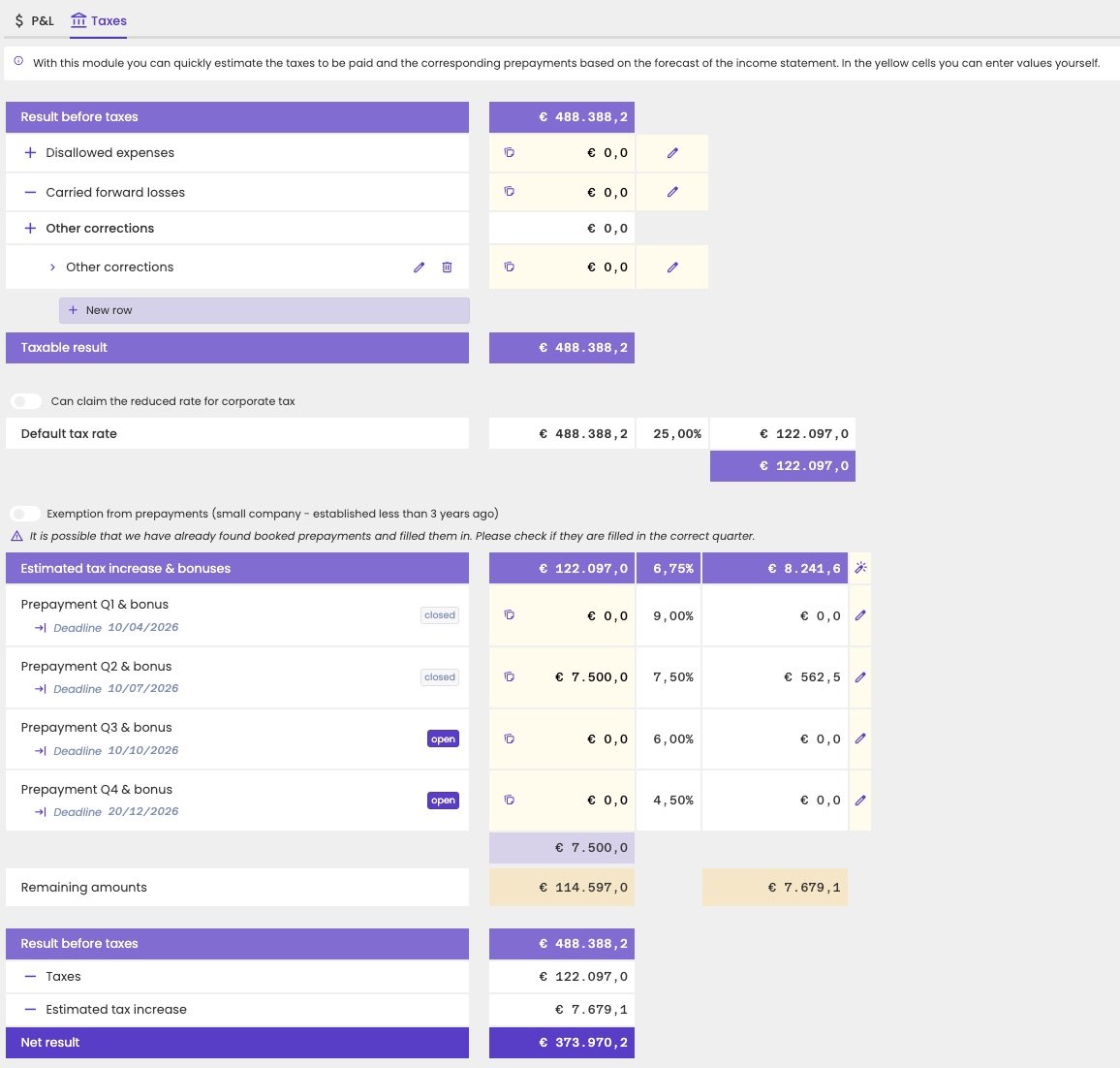
The Taxes tab of a forecast.
Calculate the taxable result
The calculation starts from the Result before taxes of the forecast. Then fill in the corrections:
aiGust then calculates the Taxable result.
Calculate the corporate tax
aiGust applies the Default tax rate to the taxable result. Turn on Can claim the reduced rate for corporate tax if the company qualifies for the reduced rate.Prepayments per quarter
The prepayment section shows each prepayment of the year, with:- The deadline, and whether the prepayment is open or closed.
- The amount prepaid.
- The bonus rate and bonus. The earlier the prepayment, the higher the bonus.
Prepayments already made
aiGust fills in the prepayments already made. It detects them from the bookings on the accounts starting with 67000. This only works for administrations with transactions, so not for administrations that only come from a compliance connector. Prepayment deadlines are fixed dates, and don’t follow the financial periods. aiGust assigns each payment to the right prepayment. Now and then a payment ends up in the wrong quarter, so check the amounts and correct them if needed.Plan the remaining prepayments
Click the wand icon next to Estimated tax increase & bonuses to let aiGust suggest a prepayment. Based on the estimated tax and tax increase, it proposes an amount for the first prepayment whose deadline hasn’t passed yet. You can change the amounts, or spread them over other quarters. The remaining tax increase updates immediately, so you can see the effect of each prepayment.Net result
At the bottom, aiGust calculates the expected Net result: the result before taxes, minus the taxes and the estimated tax increase.aiGust doesn’t send reminders for prepayment deadlines, and has no overview of which administrations still need a prepayment decision.