When your firm starts with aiGust, we set up your firm’s environment and create the first user, a key user. That’s usually you. You then sign in like any other user. See Sign in to aiGust. Usually, we do that first sign-in together with you, so we can arrange the approvals, such as the consent for Microsoft below. This page only covers what’s different for the first administrator.

Only users in aiGust can sign in

Signing in with Google or Microsoft doesn’t create a user in aiGust. Everyone at your firm needs a user in aiGust first, with the same email address as their Google or Microsoft account. Otherwise, they get an error: “User … authenticated with identity provider … does not exist. Please contact your administrator.” So after your first sign-in, add your colleagues as users. See Add and manage users. Each of them gets a welcome email. The first time someone at your firm signs in with Microsoft, Microsoft asks for consent for aiGust. Your Microsoft organisation decides who can give it. Usually, only an administrator in Microsoft Entra can. If a user who isn’t a Microsoft administrator signs in first, Microsoft shows Need admin approval, and the user can’t sign in. The app is called aigust-prod-auth-app.
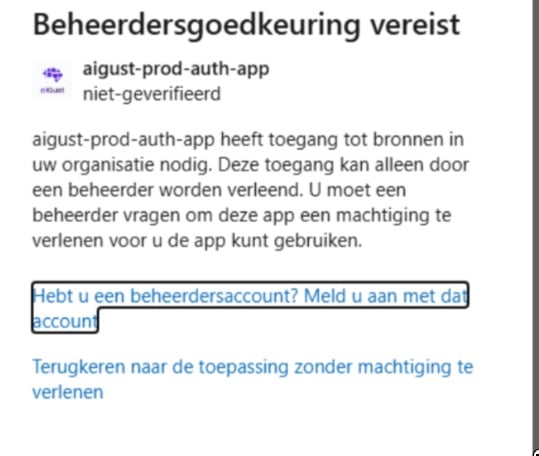
Microsoft screen Beheerdersgoedkeuring vereist (Need admin approval) for the app aigust-prod-auth-app, marked niet-geverifieerd (unverified). The text says the app needs access to resources in your organisation that only an administrator can grant, and that you have to ask an administrator for permission before you can use the app. Below, the links Hebt u een beheerdersaccount? Meld u aan met dat account (Have an admin account? Sign in with that account) and Terugkeren naar de toepassing zonder machtiging te verlenen (Return to the application without granting consent).

What a user without admin rights sees, here in Dutch.

To solve it, ask a Microsoft administrator of your organisation to sign in to aiGust with Microsoft. They see the same screen with a button to approve. They should approve it for the whole organisation, so that your colleagues don’t each get the question. Once they have, everyone at your firm can sign in with Microsoft. If that administrator doesn’t have a user in aiGust, they get the “does not exist” error right after approving. That’s fine: the approval is done, and your colleagues can sign in. Whether your organisation needs this step depends on its settings in Microsoft Entra. Some organisations let users give consent themselves. Google Workspace doesn’t need this step.